Here he goes again: Dandy/Globe columnist Russell Smith, who fancies himself enough of a language maven that he talked CBC into giving him a radio show on the English language, takes credit for a variant of l33tspeak. The last time that happened, he did it by failing to properly attribute obvious lifting from Wikipedia, one tiny degree of separation from outright plagiarism. Now, in a column about the seriously dubious nomination of woot as word of the year, Smith crows I TOLD YOU SO:
It is unseemly for a reporter [he’s actually a columnist] to gloat about a scoop… but a columnist [I thought he was a reporter] may be permitted to voice some look-at-me satisfaction when the Associated Press discovers a concept he wrote about three years ago and makes a big deal about it.
AP isn’t even the actual source. Smith explains the etymology of woot as “a cry of triumph on defeating an opponent [that] comes from the hacker imperative to control another person or company’s computer, and one does that by gaining access to the ‘root’ directory. Woot is a childish mispronunciation of root.” This is nonsense, as a real lexicographer demonstrated. At least it wasn’t cribbed from Wikipedia.
Select a category to see additional posts. Add feed/ to a category to subscribe via RSS
The foregoing posting appeared on Joe Clark’s personal Weblog on 2007.12.27 13:09. This presentation was designed for printing and omits components that make sense only onscreen. (If you are seeing this on a screen, then the page stylesheet was not loaded or not loaded properly.) The permanent link is: https://blog.fawny.org/2007/12/27/toldyouso/
Select a category to see additional posts. Add feed/ to a category to subscribe via RSS
The foregoing posting appeared on Joe Clark’s personal Weblog on 2007.12.24 15:16. This presentation was designed for printing and omits components that make sense only onscreen. (If you are seeing this on a screen, then the page stylesheet was not loaded or not loaded properly.) The permanent link is: https://blog.fawny.org/2007/12/24/snowybeach/
Select a category to see additional posts. Add feed/ to a category to subscribe via RSS
The foregoing posting appeared on Joe Clark’s personal Weblog on 2007.12.21 14:14. This presentation was designed for printing and omits components that make sense only onscreen. (If you are seeing this on a screen, then the page stylesheet was not loaded or not loaded properly.) The permanent link is: https://blog.fawny.org/2007/12/21/zodi/
It’s been discussed for about a decade. Where was it all this time? Unavailable due to persistent lies propagated by French-language broadcasters – that real-time captioning in French was impossible, or practically so, or was so limited in capacity that only a few shows could be captioned. This has been false since at least 1994; the short version of the truth is that there are not one but two French different adaptations of English stenocaptioning equipment. French broadcasters pretended there were only one such adaptation with almost no trained writers. And – surely by coincidence – no new writers were being trained.
I have demolished these intentional falsehoods and the subterfuge and undermining of French broadcasters in many places, including a response to a Canadian Human Rights Commission report on French captioning.
The standard response in recent years has been a Canadian favourite – buying into a vapourware technology. This time it’s speaker-dependent voice recognition, invariably and falsely described merely as voice recognition. The system is not listening to the audio and spitting out words. A trained human respeaker is doing that, while also pressing keys and otherwise operating a software interface. The system understands only that person’s voice.
The main proponent of this concept is the recipient of many government and related grants, CRIM, whose leaders show a lot of gall in other respects. (I’ve provided comments on their published research on occasion, only to be greeted with hostile and defensive responses or none at all. I note their commitment to scholarship and the scientific method.)
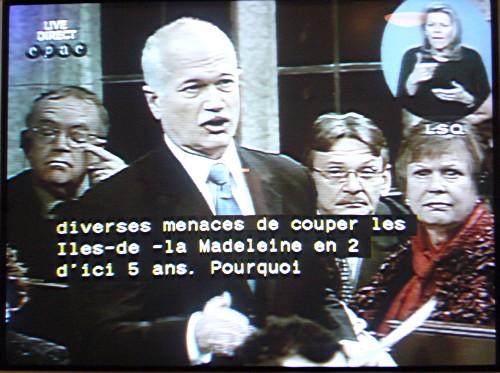
Anyway, I’ve been watching the Question Period captioning (available on either CPAC feed on CC3) and at best it is barely ready for broadcast.
Only members of Parliament are captioned. The Speaker never is (in my experience – perhaps an extended address by the Speaker would be).
They leave out riding names. This is admittedly a huge complication, one that’s readily handled by traditional stenocaptioning. (You post all of them on a wall with their briefs, that is, the keystrokes you enter to produce them.) After ten seconds’ thought I came up with a way to handle this using voicewriting, but I presume CRIM will simply apply for another grant to solve the problem.
There are too many substantive errors by any estimation, let alone the industry-standard estimation CRIM uses in its research. I’ll limit my discussion to errors that work well in photographs, otherwise I’d be here all day explaining what went wrong.
Hyphenated terms always use an errant space.
Numbers are handled wrong.
Every new sentence has to start on a new line, but doesn’t.
Slavish adherence to (misunderstood) French punctuation rules leads captioners to set a space in front of question mark and bang. As there is no nonbreaking space in the Line 21 character set, it’s only a matter of time till punctuation ends up as a widow. (“What’s a widow?”)
There is no speaker identification, save for VOIX DE L'INTERPRETE (in caps, no less) on its own line.
Now, just how confident are the House of Commons and CRIM in the reliability of this new system? Actions speak louder than captioning: The LSQ interpreter is still shown onscreen.
French-language real-time captioning is not ready for this exacting application, though the intransigent liars of the French broadcasting sector will surely hail it as a triumph.
Select a category to see additional posts. Add feed/ to a category to subscribe via RSS
The foregoing posting appeared on Joe Clark’s personal Weblog on 2007.12.20 17:48. This presentation was designed for printing and omits components that make sense only onscreen. (If you are seeing this on a screen, then the page stylesheet was not loaded or not loaded properly.) The permanent link is: https://blog.fawny.org/2007/12/20/cc-fr/
Among the flurry of accessibility standards the government of Ontario is developing (through the mechanisms of committees whose members you’ve never heard of) is one that governs transportation. It has the unusual requirement that, by 2025, electronic signs “achieve the appearance of solid characters.” (That isn’t exactly how it’s written, but that’s what they mean.)
Somebody, somewhere, seems to think that LED signs using a dot matrix that is sometimes or always visible are an accessibility barrier. I wonder if they’ve read the research on the subject. I have. “Synthesis on the legibility of variable message signing (VMS) for readers with vision loss” by Philip M. Garvey (2002) reviewed the literature on VMS (or its synonym, changeable message signing [CMS]).
Some dot matrices were found to be more legible than others in testing (e.g., 7×9 beat 5×7, except in one other case where 5×7 beat 6×7). But Garvey did not cite any research showing that dot-matrix signs were illegible. One of his conclusions (rephrased) is that to prove your signs are legible, you have to test them with your intended audience. People do tend to forget that.
The assumption seems to be that LCD, plasma, or some other variety of displays will be so advanced by 2025 – not coincidentally the deadline under the Accessibility for Ontarians with Disabilities Act – that they will be usable on transit vehicles. Well, do they work in –40° temperatures? Can you read the destination sign on a westbound bus near sundown in July? Will these displays really be brighter than LEDs? (Today, they aren’t. And LEDs aren’t the only dot-matrix technology in use now, either.)
The whole thing seems like the wrong solution to a nonexistent problem.
Select a category to see additional posts. Add feed/ to a category to subscribe via RSS
The foregoing posting appeared on Joe Clark’s personal Weblog on 2007.12.20 17:37. This presentation was designed for printing and omits components that make sense only onscreen. (If you are seeing this on a screen, then the page stylesheet was not loaded or not loaded properly.) The permanent link is: https://blog.fawny.org/2007/12/20/post-led/
The wifi does not work. You must use only a certain kind of wifi adapter. Your network must use no password or a WEP password. (Now, what kind of password? Alphabetic or hexadecimal? What length of characters?) And it still won’t work, perpetually giving error N06. I have done extensive searching on the topic (I am reasonably proficient with searching). I’ve tried everything. I know for a fact that nobody has a fix for this problem. Fortunately, I was not charged for the wifi adapter. Oops: I typed in the MAC address incorrectly. It works now, but I have not tried and will not again try to get password protection to work, as that is clearly a lost cause.
It is beyond excruciating to enter any text at all into this device. No menus, including text-entry menus, allow you to roll from the end of one dimension back to the start. To go from the bottom of a menu to the top, you must arrow-key back through every intervening step (or, in some cases, move by screenfuls at a time).
There desperately needs to be an Exit key. There are many occasions when you’re somewhere arse-deep in menus and you just want to go back to the show you were watching. You could press the Live TV button if you had been watching live TV, but if you were watching a recording, there is no simple way to get back to it apart from laboriously locating the exact episode (many menu layers deep) and selecting Resume.
I find this in rather stark contrast to many setup screens, which have a reassuring option along the lines of “Don’t do anything” that is auto-selected if you simply go back a screen. I want a simple one-key method not to do anything. (Isn’t it obvious that pressing the Tivo button while you’re on the main menu screen should turn the menus off? Shouldn’t it be a toggle?)
You can record TV shows with audio description (never mentioned by name or synonym in the manual), but you cannot selectively do that. You’re recording main audio all the time or SAP all the time. You do not want the latter case, because it gives you an unpredictable mix of description, scratchy monaural main audio, French, Spanish, a radio reading service, a radio station, static, or silence. It goes without saying that the TiVo is knowingly inaccessible to a blind person. (Version 1.0 was not knowingly inaccessible. Series 2 DT TiVos knowingly are.)
The ITC Franklin Gothic onscreen typography is set too close and is so hard to read that I unintentionally skip over important error messages. Type on the onscreen program guide is almost completely unreadable in either of the two available designs. (The Times/Helvetica Condensed typography of the user manual is second-rate, too. But the out-of-box experience is as good as anything non-Apple will get.)
The extended info display on any live TV program is hard to read, and the current time is almost completely hidden. But the corporate TV Guide logo glows red in your face like a star about to go nova.
When TiVo phones home (literally so, since the wifi doesn’t work), it’s actually spending most of its time loading advertisements and other bullshit, not the EPG for upcoming shows, which takes maybe two minutes to load in compressed XML.
You can include certain genres in a wishlist search but not exclude them. There is no way to record every program featuring pint-sized ginger Jewboy Seth Green that isn’t Family Guy.
It’s ambiguous whether or not a wishlist search for a keyword containing punctuation will really work. The manual instructs using a space for such punctuation, leading to untrustworthy keywords like SIMMONS, J K.
You can season-pass first showings and also optionally repeats, but the system is too stupid to realize that the Saturday-night airing of Dirt is a repeat of the same first-run episode it had recorded on Friday night. There are different kinds of reruns; in TV licensing, rebroadcasting is typically allowed without limitation within a week of initial broadcast. So that could be a parameter right there.
Whenever this pops up and bites you, you think you should know it by now, but here it is one more time: A TiVo has two tuners, not three, meaning if it’s recording two shows simultaneously you have to watch one of them if you want to watch “live” TV at all.
Key layout on the remote is tricky.
The number keys require full visual attention to operate.
Volume and channel are decoupled from the (absurdly overlarge and central) pause and (tiny) play buttons. Easily half the time I do something wrong with pausing, playback, or fast-forwarding.
Rather impressively, in two of the three available speeds, the system takes human reaction time into account and backs you up a bit from the frame you saw that prompted you to cancel the fast speed in the first place. I’ve found it easy to forget about this feature or to overthink it even when I know it’s there. Apple-style, you should simply trust the fast-forward and rewind functions to work.
You can’t tell which side is up on the TiVo remote without looking. This has led to many seconds of rewinding a program I meant to fast-forward. (Scientific Atlanta remotes have this down cold.)
I really want to be able to remove unwanted items from the main menu, but it won’t let me.
You can enter a postal code so the system will find programming for your actual location, but, incredibly, to sign up for TiVo service on the Web site, you have to put your entire Canadian address into one line of the address field and enter a bogus address in Wyoming with a certain ZIP code in the other fields. How can you launch a service in a new country yet be unable to accept addresses from that country?
Select a category to see additional posts. Add feed/ to a category to subscribe via RSS
The foregoing posting appeared on Joe Clark’s personal Weblog on 2007.12.16 17:17. This presentation was designed for printing and omits components that make sense only onscreen. (If you are seeing this on a screen, then the page stylesheet was not loaded or not loaded properly.) The permanent link is: https://blog.fawny.org/2007/12/16/tivo-irk/
The Macintosh application Delicious Library (which does not have a direct link at its maker’s site) allows you to catalogue and organize the books, videos, games, and records you own (but also some software and, shortly, tools). It has an addictive feature: You can use your iSight to scan barcodes for auto-entry. Just as every problem looks like a nail when you have a hammer (Cf. a labelmaker), soon you begin scouring the house for absolutely anything with a UPC. MOOORE CODES! you groan to yourself, zombie-like.
But:
Many barcodes behind plastic won’t scan. Many old barcodes, or those that are short in a vertical dimension, won’t either. (But I’ve gotten it to scan a barcode covered by another bookstore barcode when only 2mm of the original was showing.)
ISBN lookup often fails, especially with German or Swiss books, of which any typographer will have many.
There just aren’t enough keyboard equivalents. It’s laborious and painstaking to move from title field to the lookup button.
There’s no way to look up by exact title, which, for single-word titles, makes selecting from Amazon matches borderline impossible.
Entering a publication date autoconverts irrevocably to the current day and month of that year, which is less than useless as it falsifies known data.
Amazon descriptions shouldn’t be loaded by default. Amazon titles and authors are often seriously wrong and are tedious to correct.
There is no way to indicate an editor’s name for collected works.
While you can assign “borrowers” to items (hence the multiple senses of Library in the program’s name), there is no way to assign yourself as a borrower. Hence keeping track of library books is exactly backwards.
If you start just entering your own details, you find out later that you actually had to press a mode button first for the exact category of item, which wipes out everything you just typed.
Wall-to-wall Helvetica just does not work – particularly with lengthy words in titles, which are simply broken wherever.
It intermittently puts an old children’s book with no Amazon entry at the top of every single listing.
You can set up different “shelves” to organize items, but there’s no way to delete an item from the library forever if you delete it from a shelf (e.g., if you have a donations pile and want to clean them out of your collection once they’re donated). You have to search for all of them. (Tags would be helpful here.)
There’s exactly one library per installation. The makers have apparently never considered the possibility that more than one person might use the same computer. Your books and everybody else’s get intermingled.
And by far the worst deficiency of the product: You can ostensibly import and export data. But you can’t just import a list of ISBNs or ASINs. You can export precisely one thing: An unformatted plain-text dump of every single bit of information in the database, including Amazon descriptions, No CSV, no tab-delimited, no nothing.
As such, Delicious Library is useful for two purposes: Amusingly scanning your entire collection like an immigrant shop cashier and saving your library in a useless computer format that might as well be proprietary and unpublished.
Select a category to see additional posts. Add feed/ to a category to subscribe via RSS
The foregoing posting appeared on Joe Clark’s personal Weblog on 2007.12.16 16:07. This presentation was designed for printing and omits components that make sense only onscreen. (If you are seeing this on a screen, then the page stylesheet was not loaded or not loaded properly.) The permanent link is: https://blog.fawny.org/2007/12/16/annoyance-library/
Select a category to see additional posts. Add feed/ to a category to subscribe via RSS
The foregoing posting appeared on Joe Clark’s personal Weblog on 2007.12.15 17:35. This presentation was designed for printing and omits components that make sense only onscreen. (If you are seeing this on a screen, then the page stylesheet was not loaded or not loaded properly.) The permanent link is: https://blog.fawny.org/2007/12/15/bett/
Rick Poynor was a founding editor of Design Observer in 2003, so it is a special pleasure to welcome him back as a contributing writer. We are delighted to have… Rick join our stable of regular writers here at Design Observer, and we very much look forward to reading their essays.
This is the same man who whined insufferably – in print, in Print, and online – that the Web would never be up to snuff as a medium for design criticism because any idiot could write whatever they wanted and, worst of all, could do so without an editor (q.v., q.q.v.). In fact, Poynor quit Design Observer in a haze of hypocrisy over that selfsame issue.
Select a category to see additional posts. Add feed/ to a category to subscribe via RSS
The foregoing posting appeared on Joe Clark’s personal Weblog on 2007.12.15 17:31. This presentation was designed for printing and omits components that make sense only onscreen. (If you are seeing this on a screen, then the page stylesheet was not loaded or not loaded properly.) The permanent link is: https://blog.fawny.org/2007/12/15/deprinted/